Showing posts with label flipped learning. Show all posts

10 April 2016

Flipped it!

Here are the two flipped lessons I created for my final project for this course.

#1:  Writing Algebraic Expressions

This one was a real joy to create because I got to play around with EDpuzzle, which you may know, I am in love with!  I also got to sift through Dan Meyers 3 act lessons, which is always fun.  So much creativity there -- if you are a math teacher, make sure you bookmark that spreadsheet and refer to it often!

#2 Representing Independent and Dependent Variables

This lesson gave me A LOT more frustration - because I tried to be all fancy and "try new things".... curses!!!!   I tried the app Lensoo Create for my ipad, to make my own flipped video.  The app took some getting used to. I couldn't figure out how to delete slides, and when I tried to clip some of the audio, I lost the entire video.  THE. ENTIRE. THING!!!  Not even my slides remained . . . nothing.  So I had to start all over from the beginning (drawing all those graphs!!!) and I can't begin to tell you how frustrating that was for me.  Once I finished the video in Lensoo, it took some time to process and upload the video to youtube, and I was a little impatient while waiting for that.   In the mean time, I tried another new tool -- Blendspace, to pull together the element of the lesson I created.  Let me just say that I was already so frustrated from the Lensoo ordeal, that the fact that the URL is NOT www.blendspace.com really aggravated me.  The URL is https://www.tes.com/lessons.  ????  What the heck?  Why?  This just started things off on the wrong foot for me.  I started building my lesson, which I was kind of proud of.  I thought it was a pretty good lesson. And then I realized that even though I connected my google drive, I was still only able to upload microsoft word and powerpoint files.

And that is truly how I felt.  WHY Blendspace?  WHY????

Finally got the video loaded to youtube, downloaded my google slides as ppt files (see above!) and here is the final product:

Top 10 Reasons I Love EDpuzzle

EDpuzzle.

That's all I really need to say.  Just check it out for yourself and you'll be hooked.  I could end this blog post right here if I wanted to, because all you need to know is . . . EDpuzzle.  OK, let me get real with you and just tell you how I really feel about EDpuzzle....

Why have I never heard of EDpuzzle before?  You can bet your britches I'll be shouting this one from the mountain top so that no teacher is left behind.   In fact, I shared this with my colleagues during an in-house PD session and they all loved it too.  And they all agreed with my question, "Why have we never known about this before?".  It's that amazing.  Go ahead and check it out for yourself.  Here is a very short (20 second) video I made just to show my colleagues how it work (oh, did I mention the PD was in a bar?  Yeah, I thought a cool bar trick would be perfect!):


So here's my top 10 list for "Why I love EDpuzzle":

1.  You can know if a student actually watched the video or not.  From the teacher dashboard, you can see who has watched it and who has not.
2.  You can get an idea of what each student took away from the video before seeing the students the next day.  From the teacher dashboard you can see how the students did on the quiz that you gave them while watching the video.
3.  You can get an idea of how much the class learned from watching the video.  From the teacher dashboard you can see overall class data from the quiz.  If only 10% of your class got question #3 correct, you know where to start remediating the next day.
4.  You can trim the video. Why ask students to watch the parts of the video that aren't relevant.  Just trim them out.  Now you can use an hour long video and just share the most important 5 minutes that demonstrate the learning you want your students to do!
5.  You can add in questions. Active learning people!!!   I love that students cannot be passive while watching the videos.  You can structure your questions so that if students aren't paying attention, they won't get the questions right.
6.  You can see how many times students re-watched the video. We're not ogres!  If you didn't understand the first time, try again!  We are patient with our learners.
7.  You can add in your own commentary. Want students to hear it told a different way?  Pronounced with a different accent?  Want to make a connection to something you told them in class?  You can!  You can either add in an audio recording, or just a written comment that pops up during that part of the video.
8.  You can record your own audio track to the video. Have you ever found a video that has really great graphics but it's in a language other than your own?  Or maybe a video that just has great graphics.  You can just record your own voice over the video and still use it as your lesson.
9.  EDpuzzle integrates with Google Classroom. This feature is perfect for assigning videos to your students and tracking their data.  So easy!
10. Quim.   He's the founder/CEO of EDpuzzle and not only is he adorable and charming, but he's super intelligent (duh, he invented it) and best of all --- a TEACHER!  No wonder his product is so good, he knows exactly where we're all coming from!

Now, normally I would stop at 10.  To be honest, I didn't know I even had 10 items when I started the list.  But I feel like there is a big one that I should add to this list before I go.

What are you waiting for?  Go sign up NOW!

Blended Learning

I am absolutely loving this learning course from EdTechTeamOnline!  I have learned so much, and have had so many wonderful ideas validated, clarified, brought back to life, and inspire me to be a better teacher.   So far, this course on Flipped Learning has been my favorite, because I used to have such a negative attitude about Flipped Learning, but now, I have seen it in an entirely different light.

Another one of the resources that was shared with us, is this one from Khan Academy about Blended Learning. It's a short little course on Blended Learning that demonstrates the role of flipped learning in each of the Blended Learning Models shown in the course.


http://www.careerfaqs.com.au/news/news-and-views/what-is-blended-learning
So what is Blended Learning?   Yeah - I had to ask myself that, because I kind of thought I knew that already, but I know what kind of trouble that has gotten me into before.  Being the visual learner that I am I did some quick research.

If you have read my previous posts about learning about Flipped Learning here and here, you can probably guess that I basically went nuts for this graphic, because it's exactly what I've been talking about all along!!  Ohhhh..... BLENDED!!!   I get it now!  It's like taking what I thought flipped learning was and sticking it together with what I like best (face to face learning).  Voila!  Blended Learning.  I love it!

In the course above, they go through three different models of Blended Learning Classrooms:


http://latam-founders.com/community/
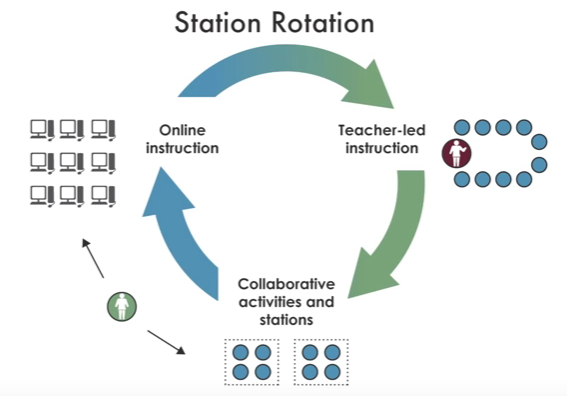
You can click on the link to the video underneath the images to learn more about each model.  One thing I love about the videos is that they offer a protagonist school that is using each model well.  It's helpful to have some examples of schools that are actually using blended learning to get a better understanding of how it might look in my classroom.  Of all these models I think the station model would fit into my classroom set up the best, but really, these examples served as a way for me to change my thinking about Flipped Learning. Now, I have so many different models and ways of thinking about Flipped Learning, I'm actually excited to give it a try in my classroom.   You know how I just love to MIX IT UP!!!

The Flipped Classroom Model

One of the resources shared for this course on Flipped Learning describes a "Flipped Classroom Model".  This really helped develop my new thinking about Flipped Learning.  As I have previously mentioned, I narrowly looked at flipped learning as using lecture videos for homework (HA!  Laughing at my much more *sophisticated* self now!). The Flipped Classroom Model looks at a larger framework, where video's and such are only part of the cycle of learning.  This might seem obvious to others, but it was new learning for me.  Important learning!

Please go to the actual article, because they actually have a much better, way more interesting graphic, but this is just me, putting it into my words, making it mean something to me ... and then of course sharing it with you!

Based on experiential learning cycles and McCarthy's 4MAT cycle of instruction.  

It's during the LEARN phase of this model that flipped learning can make learning not only independent but also differentiated.  Imagine this was a project based learning classroom.  Once the students are interested in the project they need to gather information and do research before getting started and planning the project.  And students might be tackling different parts of the project, or even working on different projects.  Flipped learning becomes essential in this type of classroom because the teacher cannot (and definitely should not) be the holder of the knowledge.  Teachers have the much bigger, much more important job of helping students process that information and make meaning out of it.  That's what teaching is all about and I believe that's why classrooms and learning communities will always be an essential part of the learning process.

I can get behind this model.  This makes sense to me.  It's not the only tool that is being used, but it's a tool.  This is a new way of looking at flipped learning for me, where the "flipping" is only part of the learning experience.  That makes so much more sense, and it is a model I can actually use in my classroom.  It is not about using lectures to teach.  I see that now.

All icons from www.nounproject.com - hook by sergey demushkin - crane by gloria vigano

29 March 2016

Flipping my understanding of Flipped Learning

I can remember sitting in conference session listening to Jeff Utecht talk about Flipped Learning and just having my mind blown!  What he was saying was so inspiring, so new, so fresh, such a great idea ... I had to try it right away!

Here is my first blog post (waaaaayyyyyyy back from 2011) about Flipped Learning:


I came home from that EARCOS conference and on Monday I was trying Flipped Learning in my classroom.  Only, I had a very limited understanding of it.  I didn't dive in past the amazing introduction our teachers gave us.  Embarrassingly, my superficial understanding had me putting lectures online for students.

Lectures.

Me.   Making video's of lectures.  WHY?    Why would I do that?  I NEVER gave lectures!  I hate giving lectures, and to top it all off, I'm TERRIBLE at giving lectures.  I hope you can tell from my usage of all caps, that giving lectures has never, should never, and will never be a part of my toolbox of teaching strategies.  I hate them.  I hate listening to them and I hate giving them.  Some people are so charismatic - and could lecture all day with people sitting on the edge of their seats.  I am NOT one of those people.   So it's easy to see how I got the Flipped Learning thing all wrong from the beginning.

But thankfully people, I'm here now.  I'm learning.  I'm not in the dark for much longer.  I'm here with an incredible cohort of colleagues to learn from at EdTechTeamOnline.

I have already been so inspired in this course, mostly by Ramsey Musallam's Ted Talk on how to spark learning:


In this video he says many inspiring things.  But my favorite is this:

I know this resonates with me because it's exactly how I used to think about flipped learning.  I wondered what all the fuss was about ... a lecture is still a lecture!  Still something I hated!   

I can see the beginning of my enlightening.  I look forward to learning more about how I can use flipped learning in my classroom.  Stay tuned for more mind-blowing learning ahead!  I have so much more to learn!

icons from www.thenounproject.com - disguise by helen tseng